How Does Your Phone's Dictionary Learn Your Favorite Words?
يعاني مستخدمو الهواتف الذكية أحيانًا من تصحيح تلقائي خاطئ للكلمات. يوضح المقال طريقة تعديل قاموس الجهاز لتجنب هذه المشكلة، مع التركيز على أجهزة آيفون وأندرويد.
Last week I was helping a friend solve some simple technical problems, but we encountered a problem that required me to search for a solution before I could help him.
The problem of auto-correcting correct words
It was more of an annoyance than a complex technical problem; my friend's iPhone was automatically correcting certain words, changing them from correct spelling to incorrect spelling.
There is a neighborhood in our residential area called 'Lakewood'. Every time my friend typed the word 'Lakewood' in a text message or social media post - whether by handwriting or voice dictation - the phone would automatically correct it to 'Lakeqood'.
The phone's word dictionary
Your smartphone contains a dictionary of the words you use.
iPhones remember the words you type frequently, and these words appear in predictive text options on the keyboard.
As for Android phones, they have built-in dictionaries at the keyboard level in the operating system. Usually you can see the dictionary words in the Android keyboard, allowing you to add or edit them directly.
Editing dictionary words on iPhone
In contrast, iPhone does not allow direct access to the words the phone stores based on your typing habits.
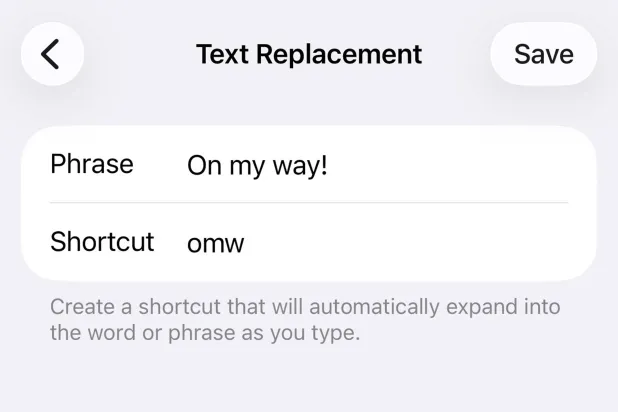
The method to edit dictionary words on iPhone is to add a 'Text Replacement' entry through Settings.
* Go to Settings, then General, then Keyboard, and tap Text Replacement.
* Tap the plus sign (+) in the top right corner.
* In the Phrase field, type the correct spelling of the word.
* In the Shortcut field, type the incorrect spelling that the phone keeps using.
* Tap Save.
A radical and comprehensive solution
If you need a radical and comprehensive solution, you can reset your phone's keyboard dictionary.
* Go to Settings, then General.
* Then go to Transfer or Reset iPhone, then Reset.
* Choose Reset Keyboard Dictionary.
This action will delete the words the phone has learned, custom suggestions, and saved keyboard shortcuts, but it will not delete any other data from the phone.
iCloud service
Finally, you can use iCloud service to keep your personal dictionary updated across all your other Apple devices. To do this, go to Settings, select your name from the top of the left menu, then choose iCloud, and enable the 'iCloud Driv' option.
* Tribune Media Services
Original source: aawsat.com





Comments (0)
Be the first to comment.